
Download Soothing Alerts – soothing alerts, calming notification sounds, peaceful audio experience, tranquil Windows notifications, relaxing sound package
Overview
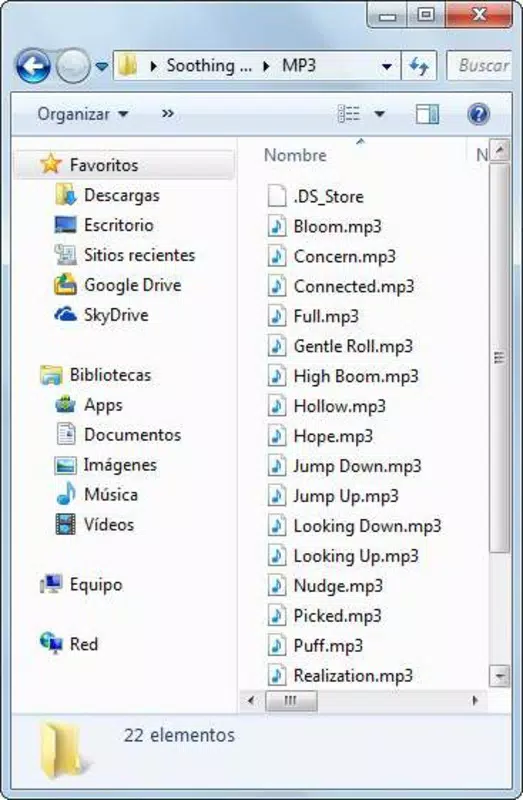
Soothing Alerts is a specialized audio enhancement tool designed to replace standard, often jarring, Windows notification sounds with a more serene and harmonious auditory experience. Developed by Joe C. Jones, the application offers a curated collection of 21 unique alert sounds, each crafted to promote calmness and reduce auditory stress. Its primary purpose is to transform routine digital interactions—such as error messages, window closures, or system reminders—into more pleasant, less disruptive events. This makes it particularly valuable for users who spend long hours at their computers, including remote workers, digital creatives, and individuals sensitive to loud or abrupt sounds.
The app serves as a productivity and wellness tool, addressing the growing concern around digital fatigue and sensory overload. By replacing harsh beeps and tones with gentle chimes, soft tones, and ambient sounds, Soothing Alerts contributes to a more balanced and mindful computing environment. It is especially suited for users seeking to personalize their digital workspace with a focus on mental well-being and aesthetic consistency. While not a full-fledged application with interactive features, it functions as a utility that enhances the existing Windows notification system. Its enduring presence since 2012 speaks to its niche but consistent value in the digital ecosystem.
Key Features & Functionality
- Diverse Sound Selection: The package includes 21 distinct alert sounds, offering variety across different emotional tones—ranging from light chimes to soft drones—ensuring users can find a sound that matches their mood or workflow.
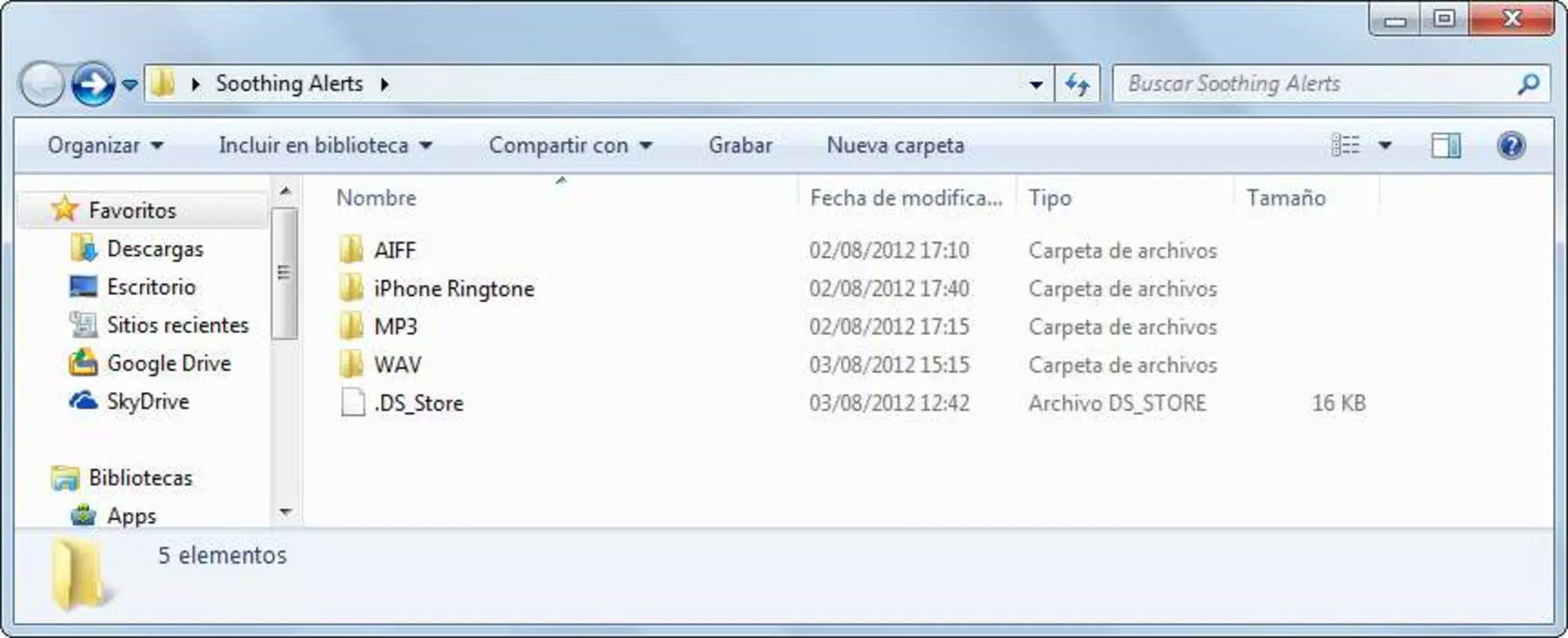
- Multiple File Formats: All sounds are available in WAV, MP3, AIFF, and iPhone alert formats, enabling seamless integration across Windows systems and mobile devices, including iOS.
- User-Friendly Tutorials: The developer provides step-by-step guides on the official website, simplifying the process of assigning custom sounds to system notifications for users of all technical levels.
- Enhanced Notification Experience: By replacing default sounds with calming alternatives, the app reduces auditory irritation and contributes to a more pleasant, less stressful computing environment.
- Mobile Compatibility: The inclusion of iPhone alert formats allows users to transfer and use the same soothing sounds on their mobile devices, ensuring auditory consistency across platforms.
For example, a user working in a quiet home office might choose a soft bell tone for incoming messages to avoid startling themselves or others. A content creator could assign a gentle harmonic tone to system alerts during video editing, maintaining focus without distraction. The flexibility in format ensures that even users with older or non-standard systems can benefit from the package.
Interface, UX & Performance
Soothing Alerts does not feature a traditional graphical user interface (GUI) as it functions primarily as a sound package rather than a standalone application. Instead, users access the files directly from the downloaded archive and manually assign them through the Windows Sound Settings. This minimalistic approach reduces resource usage and avoids unnecessary complexity, aligning with the app’s focus on simplicity and tranquility.
The user experience is straightforward but relies on user initiative. While the developer did not provide detailed performance metrics, the small file size of 11.2 MB suggests low system overhead. The application is expected to run efficiently on a wide range of Windows devices, from older systems to modern machines, without impacting performance. Responsiveness is not a concern, as the app does not run in the background or require constant processing. Stability is likely high, given the static nature of the files and the absence of runtime dependencies.
Although the developer did not list formal performance metrics, the long-standing availability of the app since 2012 indicates consistent reliability. Users can expect smooth integration with standard Windows sound configuration tools, with no reported crashes or compatibility issues in the public record.
Platform Compatibility & Technical Requirements
Soothing Alerts is designed exclusively for the Windows platform. It supports Windows operating systems, though specific version requirements were not listed. The application is distributed as a compressed file package (11.2 MB) containing multiple audio formats, making it accessible to users across various Windows editions.
Given the file size and format variety, the app is compatible with both desktop and laptop systems. The inclusion of iPhone alert formats suggests cross-device usability, though the app itself does not run on iOS. Users must manually transfer and assign the files on their mobile devices. The developer did not specify minimum OS requirements, so compatibility with older Windows versions remains possible but unconfirmed.
Pros and Cons
- Offers 21 unique, calming alert sounds to personalize notifications
- Supports multiple audio formats for broad compatibility
- Includes tutorial guides for easy setup across skill levels
- Free to download and use with no in-app purchases
- Enables consistent audio experience across Windows and iOS devices
- No native GUI or interactive interface
- Requires manual configuration through Windows Sound Settings
- Compatibility with older Windows versions not confirmed
- No automatic update mechanism provided
- Not available on mobile platforms beyond file transfer
FAQ
Is Soothing Alerts free to use?
Yes, Soothing Alerts is available at no cost. There are no subscription fees or in-app purchases required.
Can I use these sounds on my iPhone?
Yes, the package includes iPhone alert format files, allowing users to transfer and assign them to notifications on iOS devices.
Do I need to install anything to use Soothing Alerts?
No installation is required. The files are provided in a compressed archive that can be extracted and used directly.
Is Soothing Alerts compatible with Windows 10 and Windows 11?
While specific compatibility details were not listed, the app has been available since 2012 and is expected to work on modern Windows versions, though manual configuration may be needed.
How do I assign the sounds to my system notifications?
The developer provides step-by-step tutorials on the official website, guiding users through the process of assigning custom sounds via the Windows Sound Settings.
Final Thoughts
Soothing Alerts stands out as a thoughtful, minimalist utility that addresses a subtle yet meaningful aspect of digital well-being: the sound of our devices. In an era where constant notifications contribute to mental fatigue, this app offers a simple yet effective way to reduce auditory stress. Its focus on tranquility, combined with broad format support and cross-device compatibility, makes it a valuable addition for users seeking a more peaceful computing experience.
While it lacks a modern interface or automatic features, its enduring relevance since 2012 speaks to its practicality and user satisfaction. It’s ideal for individuals who value customization, mindfulness, and a clutter-free digital environment. For those looking to upgrade their notification sounds with a touch of serenity, Soothing Alerts delivers a calm, consistent, and cost-free solution.
Download Soothing Alerts now


